Veterinary practice management, from consult to checkout.
Lydia turns spoken or typed consult notes into structured drafts for clinician review. Connect the record to treatment orders and billing, with desktop charting available through connection drops.
Demos and pilots are planned for January 2027. Dates may change.
Explore subscription detailsThe patient’s record, ready for clinical review.
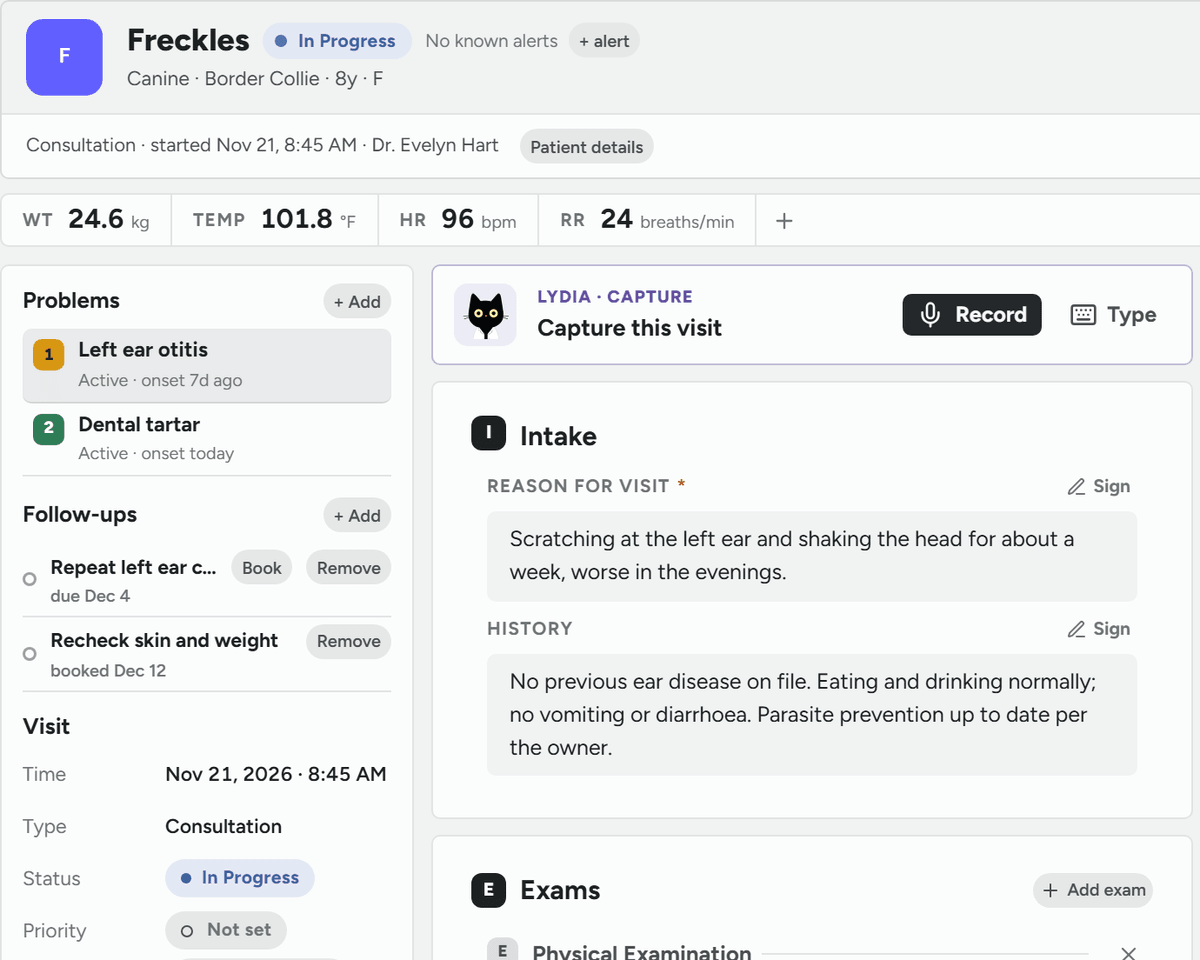
Vetriq screenshot · demo practice data
The whole clinic day, in one system.
From a morning wellness visit to a dental admission and the last checkout, your team works from connected scheduling, clinical records and billing.
Meet Lydia. Start the record with a draft.
Record or type an account of the consult. Lydia proposes structured notes and orders for review. Check the transcript, edit the draft and choose what to save. The visit’s provider signs the clinical notes separately.
From conversation to chart
Capture the consult with the client’s consent. Lydia proposes a problem-oriented draft and catalog-matched orders. Review each proposed record before saving. Lydia requires a connection.
- Structured clinical findings and notes for review
- Draft orders you approve, edit, or discard
- Save reviewed notes, then sign them as the visit’s provider

Vetriq screenshot · demo practice data
Follow a visit from arrival to invoice.
An illustrative wellness visit shows how the work connects. The product screenshots below use synthetic patient and practice data.
Book and check in
Reception books a wellness visit, checks the patient in and assigns a room.
Review the clinical draft
With client consent, capture the consult. The doctor reviews Lydia’s proposed notes and orders before saving.
Agree on treatment
Record the client’s decisions on the treatment plan. Approved catalog items create orders.
Prepare the invoice
Staff select charges for the invoice, with quantities reflecting delivered care. Provider signing remains a separate step.
Scheduling that matches how clinics run
Find appointments by provider and follow each patient through the visit. Connected stations update automatically, so reception and the treatment team can see the day’s progress.
- Day, week, and provider views with drag rescheduling
- Track each patient from check-in through checkout
- Online booking requests land right on the board

Vetriq screenshot · demo practice data
Records with clinical rigor
Organize the visit around the patient’s problems, with assessment and plan for each problem. Review the patient’s longitudinal history and measurements with available reference ranges.
- Clinical records organized around each patient’s problems
- Review treatment-plan totals before recording client approval
- Controlled-substance ledger with witnessed entries and reconciliation

Vetriq screenshot · demo practice data
Inpatient care on a live whiteboard
See hospitalized patients and scheduled care on a shared whiteboard, with flowsheets for each patient. Track which treatments are due, completed or overdue.
- Treatments due, done, and overdue at a glance
- Multi-day hospitalization with care levels
- Works on the treatment-area tablet

Vetriq screenshot · demo practice data
Billing that closes clean
Orders create charges in the client’s account. Staff assemble those charges into invoices, with quantities reflecting delivered care. End-of-day drawer close records expected cash, counted cash and the variance.
- Charges flow from treatment plans and orders
- Card, cash, and check with a real drawer close
- Stripe-connected card payment workflows

Vetriq screenshot · demo practice data
A branded portal for your clients
Clients can view available patient information and upcoming appointments, book visits and access invoices under your practice’s branding. Online invoice payment requires payment setup.
- Online booking against your real availability
- Online invoice payment after payment setup
- A client portal with your practice’s branding
A simulated client portal greeting Dana with her dog Waffles' vaccine status and next visit, above a due invoice with an online payment link.
Illustrative product depiction · synthetic demo data
Built for the Tuesday your internet dies.
After a desktop station has downloaded your practice’s records, scheduling, charting and core care workflows can continue through a connection drop. Changes queue locally for synchronization when the connection returns.
Lydia, billing actions, treatment-plan decisions and the controlled-substance log require a connection. Uncached files also need the server. Disconnected stations do not receive colleagues’ live changes.
Front desk
Local database
Synced
Exam room 2
Local database
Synced
Treatment
Local database
Synced
Illustrative animation: one station disconnects while one to three stations generate changes. Each local change uploads once and is distributed to the other two stations. Disconnected stations save changes locally, then upload their queue and download missed updates when reconnected. Motion is paused offscreen and disabled for reduced-motion preferences.
Work at the clinic or review records from home.
Use the web app while connected, or install the desktop app on Windows, macOS or Linux for local clinical records. Both use the same practice account. Offline clinical work requires a desktop station that has downloaded the practice’s records.
Plan the switch around your practice.
Your records, team and required connections belong in the evaluation.
Can you move our existing records?
Migration services will be included in the subscription. Coverage needs to be checked against your current system, records and files before a migration plan is agreed. Complete transfer coverage and a disruption-free cutover are not yet established.
Who helps our team get started?
Initial founder-led training over video calls will be included. Training arrangements need to be confirmed for each practice, and the knowledge base supports continued learning. Ongoing support hours and response commitments are still being defined.
Will our labs and other tools connect?
IDEXX and Antech lab connections and microchip registry connections are planned. Provider authorization and end-to-end validation remain outstanding. QuickBooks Online is under consideration; external imaging integration is deferred from launch. Confirm your required connections before deciding to switch.
What can we do during a connection drop?
A desktop station that has downloaded your practice’s records can continue core scheduling, charting and care tasks. Changes wait locally to sync. Lydia, billing actions, treatment-plan decisions, the controlled-substance log and uncached files need a connection. Disconnected stations do not receive colleagues’ live changes.
What happens after we join the waitlist?
We’ll reply to the email address you provide about early access. Demos and pilots are planned for January 2027; dates may change. Joining the waitlist records your interest. Product access and pilot participation are arranged separately.
A monthly practice subscription, with help getting started.
Subscription details
See how Vetriq could fit your practice.
Join the waitlist to hear about early access. Demos and pilots are planned for January 2027, with full launch targeted for February–March 2027. These dates may change.
Join the waitlist